
MultiMediaService
Multi Media Service
Hardware Equipment:
The PTZ Camera of Daystar Robot Dog can provide both visible light and infrared video streams, as shown below:

Software Interface:
The PTZ Camera video streams can be accessed through standard RTSP API network interfaces.
- RGB Camera Stream URL:
rtsp://admin:yoseen2018@192.168.144.202:554/h264/ch1/sub/av_stream - Infrared Camera Stream URL:
rtsp://admin:yoseen2018@192.168.144.202:554/h264/ch2/sub/av_stream
Important Notes:
- The development device needs to connect to the robot dog's network (WiFi Name:
IS_** WiFiPassword:DaystarBot) to access video streams. - The Camera Stream URLs should be adjusted according to IP of the robot dog:
- After connecting to the robot dog's network, check whether the robot dog's IP is
192.168.144.* - If the segment is
144, use192.168.144.202in the stream URL
- After connecting to the robot dog's network, check whether the robot dog's IP is
Video Stream Verification and Testing:
You can use VLC media player to connect and display the video streams.
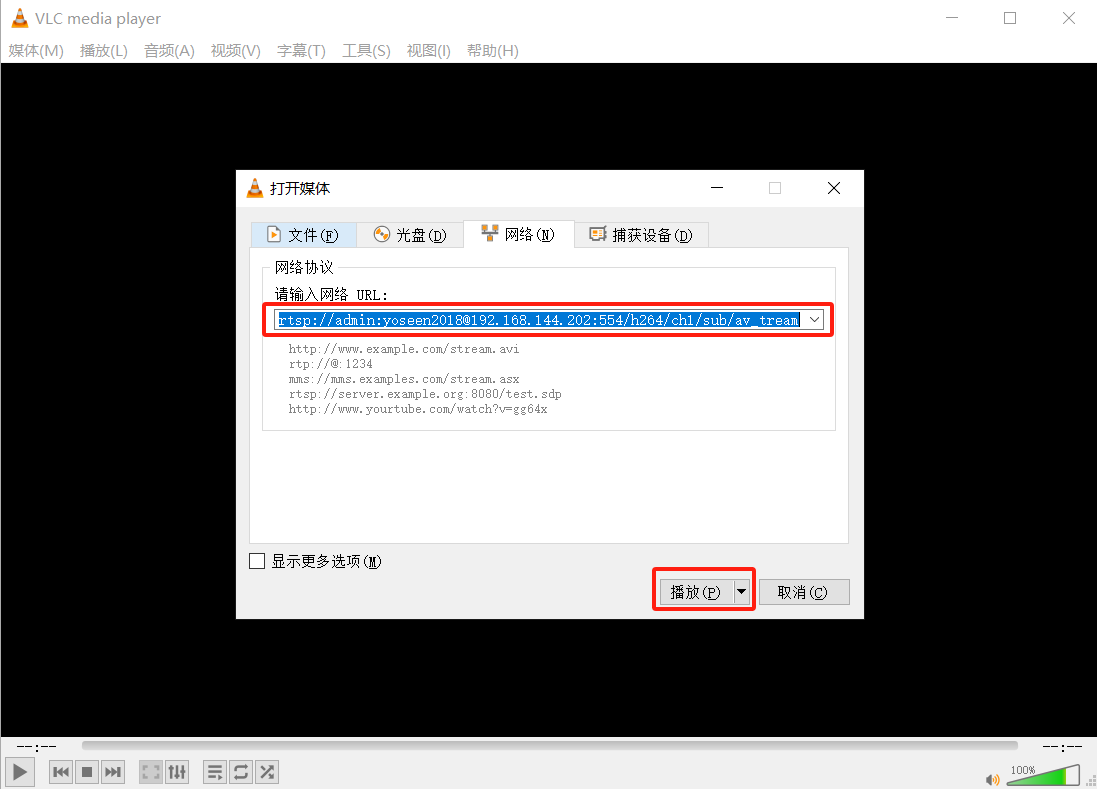
RGB Camera:

Infrared Camera:

| Function | C++ | ROS | Python | C# | Java |
|---|---|---|---|---|---|
| Get gimbal attitude information | ✔ | ✔ | ✔ | ✔ | ✔ |
| Control gimbal to target angle | ✔ | ✔ | ✔ | ✔ | ✔ |
| Control continuous gimbal motion | ✔ | ✔ | ✔ | ✔ | ✔ |
| Assist focus | ✔ | ✔ | ✔ | ✔ | ✔ |
| Switch focus mode | ✔ | ✔ | ✔ | ✔ | ✔ |
| Light control | ✔ | ✔ | ✔ | ✔ | ✔ |
| Capture Image | ✔ | - | ✔ | ✔ | ✔ |
| Download Image | ✔ | - | ✔ | ✔ | ✔ |
Gimbal Control Interface
Get Gimbal Pose Information
This interface is used to publish the current pose of the gimbal.
ROS2 Interface
| Topic Name | Topic Type | Role |
|---|---|---|
cam/PTZ_CAM/set_ptzf_position | cam_msgs::msg::PtzfPosition | Subscriber |
Message Structure
ptzf_position: of type PtzfPosition, includes the following fields:
| Parameter Name | Type | Description |
|---|---|---|
pan | float32 | Pan rotation |
tilt | float32 | Tilt rotation |
zoom | float32 | Zoom level |
focus | uint16 | Focus value |
Testing Method
ros2 topic echo /cam/PTZ_CAM/set_ptzf_positionPython Interface
void subscribe_ptzf_position(ptzf_position_callback)
Function Description Subscribe to real-time gimbal status information.
Parameter Description
| Parameter Name | Type | Required/Default | Description |
|---|---|---|---|
ptzf_position_callback | function | Required | Callback function for receiving real-time gimbal status information. |
ptzf_position Structure
| Field Name | Type | Description |
|---|---|---|
pan | float | Pan rotation. |
tilt | float | Tilt rotation. |
zoom | float | Zoom level. |
focus | uint16 | Focus value. |
Return Value
| Type | Description |
|---|---|
void | No return value. |
Usage Example
success = await client.subscribe_ptzf_position(ptzf_position_callback)
if success:
    logging.info("Successfully subscribed to gimbal position information")
else:
    logging.error("Failed to subscribe to gimbal position information")

def ptzf_position_callback(position_data):
    """Gimbal position data callback function"""
    if "ptzf_position" in position_data:
        ptzf = position_data["ptzf_position"]
        logging.info(f"Gimbal position update - Pan: {ptzf.get('pan', 0):.3f}, "
                     f"Tilt: {ptzf.get('tilt', 0):.3f}, "
                     f"Zoom: {ptzf.get('zoom', 0):.3f}, "
                     f"Focus: {ptzf.get('focus', 0)}")
void unsubscribe_ptzf_position()
Function Description Unsubscribe from gimbal position information.
Parameter Description None.
Return Value
| Type | Description |
|---|---|
void | No return value. |
C# Interface
void SubscribePtzPosition(Action callback)Function Description
Function Description Subscribe to the real-time position information of the gimbal, including pan, tilt, zoom, and focus parameters.
Parameter Description
| Parameter Name | Type | Required/Default | Description |
|---|---|---|---|
callback | Action<PtzPositionStamped> | Required | Callback function for receiving position data. |
Return Value
| Type | Description |
|---|---|
void | No return value. |
void UnsubscribePtzPosition()
Function Description Unsubscribe from the gimbal position information.
Parameter Description None.
Return Value
| Type | Description |
|---|---|
void | No return value. |
Usage Example
// Subscribe to ptz position information
_robotMutiMediaClient?.SubscribePtzPosition(OnPtzPositionReceived);

// Callback function to process position data
private void OnPtzPositionReceived(PtzPositionStamped positionData)
{
    Debug.Log($"ptz Position - Pan: {positionData.position.pan}, " +
              $"Tilt: {positionData.position.tilt}, " +
              $"Zoom: {positionData.position.zoom}, " +
              $"Focus: {positionData.position.focus}");
}

// Unsubscribe from ptz position information
_robotMutiMediaClient?.UnsubscribePtzPosition();
C++ Interface
bool subscribePtzfPosition()
Function Description Subscribe to gimbal position messages.
Parameter Description None.
Return Value
| Type | Description |
|---|---|
bool | true if successful, false otherwise. |
bool unsubscribePtzfPosition()
Function Description Unsubscribe from gimbal position messages.
Parameter Description None.
Return Value
| Type | Description |
|---|---|
bool | true if successful, false otherwise. |
Usage Example
Lenovo::Daystar::SDK sdk;
auto &sysb = sdk.getSYSB();

if (sysb.connect()) {
    // Subscribe to position messages
    sysb.subscribePtzfPosition();

    // Perform some operations...
    std::this_thread::sleep_for(std::chrono::seconds(10));

    // Unsubscribe
    if (sysb.unsubscribePtzfPosition()) {
        std::cout << "Gimbal position subscription cancelled" << std::endl;
    }
}
Java Interface
void SubscribesysbfPosition(Consumer<Object> callback)
Function Description Subscribe to gimbal position updates.
Parameter Description
| Parameter Name | Type | Required/Default | Description |
|---|---|---|---|
callback | Consumer<Object> | Required | Callback function to receive PTZF data. |
Return Value
| Type | Description |
|---|---|
void | No return value. |
Usage Example
client.SubscribesysbfPosition(data -> {
    System.out.println("PTZF Data: " + data);
});
Control Gimbal Motion Angle
This interface is used to move the gimbal to a specified angle.
Note: In the gimbal function design, the zoom parameter is always an absolute value and is not affected by the relative parameter.
ROS2 Interface
| Service Name | Service Type | Role |
|---|---|---|
/cam/PTZ_CAM/set_ptzf_position | cam_msgs::srv::SetPtzfPosition | Client |
Message Structure
cam_msgs::srv::SetPtzfPosition::Request includes the following fields:
| Parameter Name | Type | Description |
|---|---|---|
| relative | bool | Indicates whether relative movement is enabled |
| ptzf_position | PtzfPosition | Includes four fields: pan, tilt, zoom, focus |
ptzf_position fields:
| Field Name | Type | Description |
|---|---|---|
| pan | float32 | Pan rotation (-180~180) |
| tilt | float32 | Tilt rotation (-90~90) |
| zoom | float32 | Zoom level (1–25) |
| focus | uint16 | Focus value (4000–40000) |
Note
The focus field is only effective in manual focus mode.
Testing Method
- Call the interface to move the gimbal 90° left, 30° up, and zoom to 10x:
ros2 service call /cam/PTZ_CAM/set_ptzf_position cam_msgs/srv/SetPtzfPosition "relative: false
ptzf_position:
  pan: 90.0
  tilt: 30.0
  zoom: 10.0
  focus: 0"
Python Interface
set_ptzf_position(position: PtzfPosition, relative)
Function Description Control the gimbal to move to a specified angle.
Parameter Description
| Parameter Name | Type | Required/Default | Description |
|---|---|---|---|
position | PtzfPosition | Required | Angle command. |
relative | bool | Required | Indicates whether relative movement is enabled. |
PtzfPosition Structure
| Field Name | Type | Description |
|---|---|---|
pan | float | Pan rotation (-180~180). |
tilt | float | Tilt rotation (-90~90). |
zoom | float | Zoom level (1~25). |
focus | float | Focus value (4000~40000). |
Return Value
| Type | Description |
|---|---|
bool | Whether the operation was successful. |
Usage Example
async with WebSocketRobotClient(host=args.host, port=args.port) as client:
    await asyncio.sleep(1)
    position = PtzfPosition(
        pan=args.pan,
        tilt=args.tilt,
        zoom=args.zoom,
        focus=args.focus
    )
    success = await client.set_ptzf_position(position, relative=args.relative)
C# Interface
void SetPtzPosition(float pan, float tilt, float zoom, ushort focus, bool relative = false)
Function Description Control the gimbal to move to a specified angle.
Parameter Description
| Parameter Name | Type | Required/Default | Description |
|---|---|---|---|
pan | float | Required | Pan angle (-180~180). |
tilt | float | Required | Tilt angle (-90~90). |
zoom | float | Required | Zoom level (1~25). |
focus | ushort | Required | Focus value. |
relative | bool | false | Whether it is a relative position (true = relative, false = absolute). |
Return Value
| Type | Description |
|---|---|
void | No return value. |
Usage Example
// Absolute position control
robotMutiMediaClient.SetPtzPosition(45.0f, -30.0f, 2.0f, 0, false);

// Relative position control (adjust based on the current position)
robotMutiMediaClient.SetPtzPosition(10.0f, 0, 0, 0, true);
C++ Interface
void callPTZPosition(float pan, float tilt, float zoom, uint16_t focus, bool relative = false)
Function Description Control the gimbal to move to the specified position.
Parameter Description
| Parameter Name | Type | Required/Default | Description |
|---|---|---|---|
pan | float | Required | Pan angle (-180~180). |
tilt | float | Required | Tilt angle (-90~90). |
zoom | float | Required | Zoom level (1~25). |
focus | uint16_t | Required | Focus value (4000~40000). |
relative | bool | false | Whether it is a relative position (true = relative, false = absolute). |
Return Value
| Type | Description |
|---|---|
void | No return value. |
Usage Example
Lenovo::Daystar::SDK sdk;
auto &sysb = sdk.getSYSB();

if (sysb.connect()) {
    // Absolute position control: move gimbal to pan 30 degrees, tilt 15 degrees
    sysb.callPTZPosition(30.0f, 15.0f, 1.5f, 100, false);

    // Relative position control: pan right 10 degrees based on the current position
    sysb.callPTZPosition(10.0f, 0.0f, 1.0f, 100, true);
}
Java Interface
void SetsysbPosition(PtzPosition position)
Function Description Control the gimbal to move to a specified angle.
Parameter Description
| Parameter Name | Type | Required / Default | Description |
|---|---|---|---|
position | PtzPosition | Required | Gimbal position object. |
Return Value
| Type | Description |
|---|---|
void | No return value. |
Usage Example
PtzPosition pos = new PtzPosition();
pos.pan = 10.0f;
pos.tilt = 5.0f;
pos.zoom = 1.0f;
pos.focus = 0;
client.SetsysbPosition(pos);
Control Continuous Gimbal Motion
This interface is used to continuously move the gimbal. It involves four parameters:
| Parameter Name | Type | Description |
|---|---|---|
| pan | float32 | Horizontal angular velocity. Positive = counterclockwise, negative = clockwise, 0 = no movement (-12~12) |
| tilt | float32 | Vertical angular velocity. Positive = upward, negative = downward, 0 = no movement (-12~12) |
| zoom | float32 | Zoom velocity. Positive = zoom in, negative = zoom out, 0 = no movement (-12~12) |
| focus | uint16 | Focus velocity. Positive = push focus farther, negative = pull focus closer, 0 = no movement (-12~12) |
Note
When controlling continuous pan/tilt movement, the zoom and focus parameters must be set to 0.
ROS2 Interface
cam_msgs::srv::PtzfCmdVel::Request includes the following fields:
| Parameter Name | Type |
|---|---|
| pan | float32 |
| tilt | float32 |
| zoom | float32 |
| focus | uint16 |
Testing Method
- Call the interface to make the gimbal start rotating left:
ros2 topic pub /cam/PTZ_CAM/ptzf_cmd_vel cam_msgs/srv/PtzfCmdVel "
  pan: 8.0
  tilt: 0.0
  zoom: 0.0
  focus: 0"
Python Interface
bool publish_ptzf_cmd_vel(cmd_vel: PtzfCmdVel)
Function Description Continuously control gimbal motion.
Parameter Description
| Parameter Name | Type | Required/Default | Description |
|---|---|---|---|
cmd_vel | PtzfCmdVel | Required | Velocity command object. |
PtzfCmdVel Definition
| Field Name | Type | Default | Description |
|---|---|---|---|
pan | float | 0.0 | Horizontal angular velocity (-12~12). |
tilt | float | 0.0 | Vertical angular velocity (-12~12). |
zoom | float | 0.0 | Zoom velocity (-12~12). |
focus | float | 0.0 | Focus velocity (-12~12). |
Return Value
| Type | Description |
|---|---|
bool | Whether the operation was successful. |
Usage Example
async with WebSocketRobotClient(host=args.host, port=args.port, client_name="complex_control") as client:
    await asyncio.sleep(1)
    await client.advertise_ptzf_cmd_vel()
    await asyncio.sleep(0.5)
    cmd_vel = PtzfCmdVel(
        pan=args.pan,
        tilt=args.tilt,
        zoom=args.zoom,
        focus=args.focus
    )
    print(f"Composite motion control: Pan={args.pan}, Tilt={args.tilt}, Zoom={args.zoom}, Focus={args.focus}")
    success = await client.publish_ptzf_cmd_vel(cmd_vel)
C# Interface
void MovePtzContinues(float panSpeed, float tiltSpeed, float zoomSpeed, float focusSpeed = 0)
Function Description
Continuously control gimbal motion.
Parameter Description
| Parameter Name | Type | Required/Default | Description |
|---|---|---|---|
panSpeed | float | Required | Horizontal angular velocity (-12~12). |
tiltSpeed | float | Required | Vertical angular velocity (-12~12). |
zoomSpeed | float | Required | Zoom velocity (-12~12). |
focusSpeed | float | 0 | Focus velocity (-12~12). |
Return Value
| Type | Description |
|---|---|
void | No return value. |
Usage Example
// Continuous move left
robotMutiMediaClient.MovePtzContinues(8.0f, 0, 0, 0);
// Continuous move right
robotMutiMediaClient.MovePtzContinues(-8.0f, 0, 0, 0);

// Continuous move up
robotMutiMediaClient.MovePtzContinues(0, 8.0f, 0, 0);
// Continuous move down
robotMutiMediaClient.MovePtzContinues(0, -8.0f, 0, 0);

// Zoom in
robotMutiMediaClient.MovePtzContinues(0, 0, 1.0f, 0);
// Zoom out
robotMutiMediaClient.MovePtzContinues(0, 0, -1.0f, 0);

// Stop movement
robotMutiMediaClient.MovePtzContinues(0, 0, 0, 0);
C++ Interface
void publishPtzfCmdVel(float pan, float tilt, float zoom, float focus)
Function Description
Publish gimbal velocity control command.
Parameter Description
| Parameter Name | Type | Required/Default | Description |
|---|---|---|---|
pan | float | Required | Horizontal angular velocity. Positive = counterclockwise, negative = clockwise, 0 = no movement (-12~12). |
tilt | float | Required | Vertical angular velocity. Positive = upward, negative = downward, 0 = no movement (-12~12). |
zoom | float | Required | Zoom velocity. Positive = zoom in, negative = zoom out, 0 = no movement (-12~12). |
focus | float | Required | Focus velocity. Positive = push focus farther, negative = pull focus closer, 0 = no movement (-12~12). |
Return Value
| Type | Description |
|---|---|
void | No return value. |
Usage Example
Lenovo::Daystar::SDK sdk;
auto &sysb = sdk.getSYSB();

if (sysb.connect()) {
    // Rotate to the right at medium speed
    for (int i = 0; i < 40; i++)
    {
        sysb.publishPtzfCmdVel(0.8f, 0.0f, 0.0f, 0.0f);
        // std::cout << "Sent velocity control command " << (i + 1) << "/40" << std::endl;
        std::this_thread::sleep_for(std::chrono::milliseconds(50));
    }

    std::this_thread::sleep_for(std::chrono::seconds(2));

    // Stop all movement
    sysb.stopAllMovement();
}
Java Interface
void MovesysbContinues(PtzPosition position)
Function Description Continuously control gimbal motion.
Parameter Description
| Parameter Name | Type | Required / Default | Description |
|---|---|---|---|
position | PtzPosition | Required | Use PtzPosition structure to pass velocity (pan, tilt, zoom, focus). |
Return Value
| Type | Description |
|---|---|
void | No return value. |
Usage Example
PtzPosition speed = new PtzPosition();
speed.pan = 5.0f; // Speed
client.MovesysbContinues(speed);
Auxiliary Focus
ROS2 Interface
This interface is used to move the gimbal to a specified angle.
| Service Name | Service Type | Role |
|---|---|---|
/cam/PTZ_CAM/auto_focus | cam_msgs::srv::AutoFocus | Client |
Message Structure
cam_msgs::srv::AutoFocus::Request includes the following fields:
| Parameter Name | Type | Description |
|---|---|---|
| focus_mode | uint8 | 1: Global auto focus 2: Regional auto focus |
| pixel_bbox | Bbox | Includes four fields: x_min, y_min, x_max, y_max |
pixel_bbox fields:
| Field Name | Type | Description |
|---|---|---|
| x_min | int32 | x-coordinate of the top-left corner of the rectangle |
| y_min | int32 | y-coordinate of the top-left corner of the rectangle |
| x_max | int32 | x-coordinate of the bottom-right corner of the rectangle |
| y_max | int32 | y-coordinate of the bottom-right corner of the rectangle |
Note
pixel_bbox is only valid in regional auto focus mode.
Testing Method
- Call the interface to perform regional auto focus:
ros2 service call /cam/PTZ_CAM/auto_focus cam_msgs/srv/AutoFocus "focus_mode: 2
pixel_bbox:
  x_min: 500
  y_min: 300
  x_max: 1600
  y_max: 900"
Python Interface
bool auto_focus(focus_mode, pixel_bbox=None)
Function Description Implement gimbal focus function.
Parameter Description
| Parameter Name | Type | Required/Default | Description |
|---|---|---|---|
focus_mode | int | Required | Focus mode: 1=Global auto focus, 2=Regional auto focus. |
pixel_bbox | dict | None | Focus area settings (only valid in regional auto focus mode). |
Return Value
| Type | Description |
|---|---|
bool | Whether the operation was successful. |
Usage Example
async with WebSocketPtzClient(host=args.host, port=args.port) as client:
        await asyncio.sleep(1)
        if args.mode == 1:
            success = await client.auto_focus(focus_mode=1)
        elif args.mode == 2:
            if hasattr(args, 'bbox') and args.bbox:
                try:
                    coords = [int(x.strip()) for x in args.bbox.split(',')]
                    bbox = {
                        "x_min": coords[0],
                        "y_min": coords[1],
                        "x_max": coords[2],
                        "y_max": coords[3]
                    }
                    success = await client.auto_focus(focus_mode=2, pixel_bbox=bbox)
C# Interface
bool AutoFocus(int focusMode = 1, PixelBoundingBox? pixelBbox = null, int timeoutMs = 8000)
Function Description Enable auto focus.
Parameter Description
| Parameter Name | Type | Required/Default | Description |
|---|---|---|---|
focusMode | int | 1 | Focus mode: 1=Global auto focus, 2=Regional auto focus. |
pixelBbox | PixelBoundingBox? | null | Focus area settings (only valid in regional auto focus mode). |
timeoutMs | int | 8000 | Timeout in milliseconds. |
Return Value
| Type | Description |
|---|---|
bool | Whether the operation was successful. |
Usage Example
// Semi-automatic focus
bool success = _robotMutiMediaClient?.AutoFocus(1) ?? false;

// Regional focus (using default center region)
bool success = _robotMutiMediaClient?.AutoFocus(2) ?? false;

// Regional focus (custom region)
PixelBoundingBox customRegion = new PixelBoundingBox
{
    x_min = 100, y_min = 100,
    x_max = 300, y_max = 300
};
bool success = _robotMutiMediaClient?.AutoFocus(2, customRegion) ?? false;
C++ Interface
bool autoFocus(int focus_mode = 1)
Function Description Enable auto focus.
Parameter Description
| Parameter Name | Type | Required/Default | Description |
|---|---|---|---|
focus_mode | int | 1 | Focus mode (1 = auto focus). |
Return Value
| Type | Description |
|---|---|
bool | true if successful, false otherwise. |
Usage Example
Lenovo::Daystar::SDK sdk("192.168.144.103:50051");
auto &sysb = sdk.getSYSB();

if (sysb.connect()) {
    if (sysb.autoFocus(1)) {
        std::cout << "Auto focus enabled successfully" << std::endl;
    } else {
        std::cerr << "Failed to enable auto focus" << std::endl;
    }
}
Java Interface
void AutoFocus(int focusMode, PixelBoundingBox boundingBox)
Function Description Implement gimbal focus function.
Parameter Description
| Parameter Name | Type | Required/Default | Description |
|---|---|---|---|
focusMode | int | Required | 1=Global auto focus, 2=Regional auto focus. |
boundingBox | PixelBoundingBox | Optional | Focus area (valid only for Regional mode). |
Return Value
| Type | Description |
|---|---|
void | No return value. |
Usage Example
client.AutoFocus(1, null);Switch Focus Mode
ROS2 Interface
This interface is used to move the gimbal to a specified angle.
| Service Name | Service Type | Role |
|---|---|---|
/cam/PTZ_CAM/set_focus_mode | cam_msgs::srv::SetFocusMode | Client |
Message Structure
cam_msgs::srv::SetFocusMode::Request includes the following field:
| Parameter Name | Type | Description |
|---|---|---|
| focus_mode | uint8 | 1: Semi-automatic focus 2: Manual focus |
Testing Method
- Call the interface to switch focus mode:
ros2 service call /cam/PTZ_CAM/set_focus_mode cam_msgs/srv/SetFocusMode "focus_mode: 2"Python Interface
bool set_focus_mode(focus_mode: int)
Function Description Set the gimbal focus mode.
Parameter Description
| Parameter Name | Type | Required/Default | Description |
|---|---|---|---|
focus_mode | int | Required | Focus mode: 1=Semi-automatic focus, 2=Manual focus. |
Return Value
| Type | Description |
|---|---|
bool | Whether the operation was successful. |
Usage Example
async with WebSocketPtzClient(host=args.host, port=args.port) as client:
    await asyncio.sleep(1)
    # Set to semi-automatic focus
    await client.set_focus_mode(1)
    # Set to manual focus
    await client.set_focus_mode(2)
C# Interface
bool SetFocusMode(int focusMode, int timeoutMs = 8000)
Function Description Set the gimbal focus mode.
Parameter Description
| Parameter Name | Type | Required/Default | Description |
|---|---|---|---|
focusMode | int | Required | Focus mode: 1=Semi-automatic focus, 2=Manual focus. |
timeoutMs | int | 8000 | Timeout in milliseconds. |
Return Value
| Type | Description |
|---|---|
bool | Whether the operation was successful. |
Usage Example
// Set to semi-automatic focus mode
bool success = _robotMutiMediaClient?.SetFocusMode(1) ?? false;

// Set to manual focus mode
bool success = _robotMutiMediaClient?.SetFocusMode(2) ?? false;
Java Interface
void SetFocusMode(int focusMode)
Function Description Set focus mode.
Parameter Description
| Parameter Name | Type | Required/Default | Description |
|---|---|---|---|
focusMode | int | Required | 1=Semi-automatic, 2=Manual. |
Return Value
| Type | Description |
|---|---|
void | No return value. |
Usage Example
client.SetFocusMode(1);C++ Interface
bool setFocusMode(int focus_mode)
Function Description Set focus mode.
Parameter Description
| Parameter Name | Type | Required/Default | Description |
|---|---|---|---|
focus_mode | int | Required | Focus mode: 1=Semi-automatic focus, 2=Manual focus. |
Return Value
| Type | Description |
|---|---|
bool | true if successful, false otherwise. |
Usage Example
Lenovo::Daystar::SDK sdk;
auto &sysb = sdk.getSYSB();

if (sysb.connect()) {
    if (sysb.setFocusMode(2)) {
        std::cout << "Focus mode set successfully" << std::endl;
    } else {
        std::cerr << "Failed to set focus mode" << std::endl;
    }
}
Light Control
ROS2 Interface
This interface is used to control the gimbal light.
| Service Name | Service Type | Role |
|---|---|---|
/cam/PTZ_CAM/light_cmd | cam_msgs::srv::SetBool | Client |
Message Structure
cam_msgs::srv::SetBool::Request includes the following field:
| Value | Description |
|---|---|
1 | Turn on the light |
0 | Turn off the light |
Testing Method
- Call the interface to switch the light state:
ros2 service call /cam/PTZ_CAM/light_cmd cam_msgs/srv/SetBool "focus_mode: 2"Python Interface
bool light_cmd(enable: bool)
Function Description Control the gimbal light.
Parameter Description
| Parameter Name | Type | Required/Default | Description |
|---|---|---|---|
enable | bool | Required | true to turn on the light, false to turn off. |
Return Value
| Type | Description |
|---|---|
bool | Whether the operation was successful. |
Usage Example
async with WebSocketPtzClient(host=args.host, port=args.port, client_name="light_control") as client:
    await asyncio.sleep(1)
    action_str = "Turn on" if args.enable else "Turn off"
    print(f"{action_str} gimbal light...")
    success = await client.light_cmd(args.enable)
C# Interface
void SetPtzLight(bool enable)
Function Description Control the gimbal light.
Parameter Description
| Parameter Name | Type | Required/Default | Description |
|---|---|---|---|
enable | bool | Required | true to turn on the light, false to turn off. |
Return Value
| Type | Description |
|---|---|
void | No return value. |
Usage Example
// Turn on PTZ light
robotMutiMediaClient.SetPtzLight(true);

// Turn off PTZ light
robotMutiMediaClient.SetPtzLight(false);
Java Interface
void LightCmd(boolean enable)
Function Description Control the gimbal light.
Parameter Description
| Parameter Name | Type | Required/Default | Description |
|---|---|---|---|
enable | boolean | Required | true=On, false=Off. |
Return Value
| Type | Description |
|---|---|
void | No return value. |
Usage Example
client.LightCmd(true);C++ Interface
bool lightCmd(bool enable)
Function Description Control the fill light.
Parameter Description
| Parameter Name | Type | Required/Default | Description |
|---|---|---|---|
enable | bool | Required | true to turn on the fill light, false to turn off. |
Return Value
| Type | Description |
|---|---|
bool | true if successful, false otherwise. |
Usage Example
Lenovo::Daystar::SDK sdk("192.168.144.103:50051");
auto &sysb = sdk.getSYSB();

if (sysb.connect()) {
    // Turn on the fill light
    if (sysb.lightCmd(true)) {
        std::cout << "Fill light turned on" << std::endl;
    }

    std::this_thread::sleep_for(std::chrono::seconds(5));

    // Turn off the fill light
    if (sysb.lightCmd(false)) {
        std::cout << "Fill light turned off" << std::endl;
    }
}
Capture Image
ROS2 Interface
N/A
Python Interface
async def capture_image(image_type: str = "rgb", image_name: str = "") -> dict
Function Description Capture an image using the PTZ camera.
Parameter Description
| Parameter Name | Type | Required/Default | Description |
|---|---|---|---|
image_type | str | rgb | Image type ("rgb" or "infra"). |
image_name | str | Optional | Image name (without extension). If empty, generates automatically. |
Return Value
| Type | Description |
|---|---|
dict | Contains success(bool) and message(str). |
Usage Example
await client.capture_image("rgb", "my_photo")C# Interface
(bool success, string message) CaptureImage(string type, string imageName, int timeoutMs = 10000)
Function Description Capture an image using the PTZ camera.
Parameter Description
| Parameter Name | Type | Required/Default | Description |
|---|---|---|---|
type | string | Required | Image type ("rgb" or "infra"). |
imageName | string | Required | Name of the image. |
timeoutMs | int | 10000 | Timeout in milliseconds. |
Return Value
| Type | Description |
|---|---|
(bool, string) | Success status and message. |
Usage Example
var result = client.CaptureImage("rgb", "photo1");C++ Interface
CaptureImageReply captureImage(const std::string &image_type = "rgb", const std::string &image_name = "")
Function Description Capture an image.
Parameter Description
| Parameter Name | Type | Required/Default | Description |
|---|---|---|---|
image_type | string | rgb | Image type. |
image_name | string | Optional | Image name. |
Return Value
| Type | Description |
|---|---|
CaptureImageReply | Contains success flag, message, and file path. |
Usage Example
Lenovo::Daystar::SDK sdk;
auto &sysb = sdk.getSYSB();

std::cout << "Image Type: 1=RGB, 2=infra" << std::endl;
int type_choice = getIntInput("Choose Image type(1 or 2, default 1): ");
std::string image_type = (type_choice == 2) ? "infra" : "rgb";

std::string image_name = getStringInput("Inpute Image name: ");

auto result = sysb.captureImage(image_type, image_name);
if (result.success)
{
    std::cout << "✓ Capture Image successful (type: " << image_type << ")" << std::endl;
    if (!result.file_path.empty()) {
        std::cout << "  filepath: " << result.file_path << std::endl;
    }
}
else
{
    std::cout << "✗ Capture Failed: " << result.message << std::endl;
}
Java Interface
ServiceOperationResponse CapturePtzImage(String imageType, String savePath)
Function Description Capture an image and save it to the specified path.
Parameter Description
| Parameter Name | Type | Required/Default | Description |
|---|---|---|---|
imageType | String | Required | Image type ("rgb" or "infra"). |
savePath | String | Required | Path to save the image. |
Return Value
| Type | Description |
|---|---|
ServiceOperationResponse | Result of the operation. |
Usage Example
client.CapturePtzImage("rgb", "my_image");Download Image
ROS2 Interface
N/A
Python Interface
async def download_image(image_name: str) -> bytes
Function Description Download a captured image.
Parameter Description
| Parameter Name | Type | Required/Default | Description |
|---|---|---|---|
image_name | str | Required | Name of the image to download (without extension). |
Return Value
| Type | Description |
|---|---|
bytes | The binary data of the image. |
Usage Example
data = await client.download_image("my_photo")C# Interface
void DownloadImage(string imageName, int requestId, int timeoutMs = 30000)
Function Description Download an image (asynchronous). You need to register FetchAssetResponseCallback to receive the data.
Parameter Description
| Parameter Name | Type | Required/Default | Description |
|---|---|---|---|
imageName | string | Required | Name of the image. |
requestId | int | Required | Request ID for matching the response. |
Return Value
| Type | Description |
|---|---|
void | No return value. Data returned via callback. |
Usage Example
client.RegisterFetchAssetResponseCallback((response) => {
    // Handle response.data
});
client.DownloadImage("photo1", 123);
C++ Interface
CommReply downloadImage(const std::string &image_name, std::vector<uint8_t> &file_data, int request_id)
Function Description Download an image.
Parameter Description
| Parameter Name | Type | Required/Default | Description |
|---|---|---|---|
image_name | string | Required | Image name. |
file_data | vector<uint8_t>& | Output | Buffer to store image data. |
Return Value
| Type | Description |
|---|---|
CommReply | Success status and message. |
Usage Example
Lenovo::Daystar::SDK sdk;
auto &sysb = sdk.getSYSB();
std::string image_name = getStringInput("Input image name: ");
std::vector<uint8_t> file_data;

auto result = sysb.downloadImage(image_name, file_data);
if (result.success == true)
{
    std::string filename = image_name;
    if (filename.find(".") == std::string::npos) {
        filename += ".jpeg";
    }

    std::string download_dir = ensureDownloadDir();
    std::string save_path = download_dir + "/" + filename;

    std::ofstream out_file(save_path, std::ios::binary);
    if (!out_file) {
        std::cout << "✗ Can not create file: " << save_path << std::endl;
        break;
    }

    out_file.write(reinterpret_cast<const char *>(file_data.data()), file_data.size());
    out_file.close();

    if (out_file.fail()) {
        std::cout << "✗ Write file failed: " << save_path << std::endl;
    } else {
        std::cout << "✓ Download image successful" << std::endl;
        std::cout << "  File size: " << (file_data.size() / 1024.0) << " KB" << std::endl;
        std::cout << "  saved to: " << save_path << std::endl;
    }
}
else
{
    std::cout << "✗ Download image failed: " << result.message << std::endl;
}
Java Interface
CompletableFuture<byte[]> downloadImage(String imageName, int timeoutSeconds)
Function Description Download an image asynchronously.
Parameter Description
| Parameter Name | Type | Required/Default | Description |
|---|---|---|---|
imageName | String | Required | Name of the image. |
timeoutSeconds | int | Required | Timeout in seconds. |
Return Value
| Type | Description |
|---|---|
CompletableFuture<byte[]> | Future containing the image data. |
Usage Example
client.downloadImage("my_image", 30).thenAccept(data -> {
    // handle data
});